Use a final checklist for a client project handoff
Use a final sign-off list to find missing or incorrect files in a completed client handoff ZIP.
Before you send a client handoff, open the actual delivery archive in a clean location, compare its files against the approved list, and check that every essential file reopens with the expected content. The practice archive looked healthy when opened, but the path check revealed that Data/orders.csv was missing. The corrected archive contained all three expected files, each opened successfully and each matched its reference digest. Mark a check complete only when you have evidence from the copy the client will receive, and keep any failed item visible until you can repeat the check.
What to look for
Use this checklist when a project is already packaged and you are about to send a link, attach the ZIP or move a delivery into a client folder. It applies to the last review of that candidate. An archive icon, a completed upload or a manifest saved during assembly can look reassuring while a required file is absent. Check what is actually present where the recipient will look.
The issue may surface only when a client opens a working document, searches for an expected data file or sees a draft beside the approved copy. The final pass helps catch those problems by testing names, contents and access as independent checks. Choose evidence the reviewer can describe without referring to the staging folder or another ZIP with a similar name.
Why it happens
Before you begin
Have the exact outgoing candidate and an independently agreed list of what it should include. Put the approved list outside that candidate so it still describes what should have been delivered if the archive omits a file. For the exercise use handoff-expected.csv and start with handoff-missing-orders.zip. Keep handoff-checked.zip available for the second pass. The expected CSV lists the path, byte count and SHA-256 for each of three payload files.
The checklist expects Documents/brief.pdf, Images/cover.png and Data/orders.csv. The intentionally incomplete ZIP opens and contains two valid files. That is enough to tell you that the ZIP is readable, while the separate list tells you which deliverable is missing. Use a fresh inspection folder if you extract it. An existing extraction folder could hold a leftover orders.csv from an older test and make the missing file look present.
If you review an actual client delivery with a colleague, agree on the candidate name or saved revision and the final location. Decide who will check any recipient-only permissions. Use the content owner or the approved reference as the basis for checking drafts, release labels and handwritten changes. The sample has public practice documents and requires no account or confidential information.
Steps
Check the exact candidate and its delivery location.
Record the filename or version of the archive at the point where it will be sent. If a download link is already set, download the candidate from that location using an appropriately authorized view. If you are sending a local attachment, open it from its outgoing location. Match the name with the delivery note and verify that the file is readable as an archive. If you can only inspect the local copy, mark the destination access check as pending and keep it separate in your record.
- zip.
- It has a valid ZIP structure and measured 52,731 bytes.
- The test opened it directly.
- Use the filename to distinguish it from the verified example before looking inside.
Check expected paths against the actual directory listing.
Read the archive’s names from its root and compare one entry at a time with the independent list. Keep directories and extensions in the comparison. A same-named file in a different directory may not satisfy a downstream reference. Apply the destination’s case rules as needed and record duplicate or surprising entries for review. Mark internal-only and superseded files if they appear in a delivery that should contain only approved material.
- png.
- csv is expected and absent.
- This is the failed check.
- The lab records the full missing path and confirms that no unlisted item was present.
- A total count can help you spot a problem.
- Compare paths as well, since an unrelated extra file could keep the count unchanged while the correct file is missing.
Review the approved content after opening it.
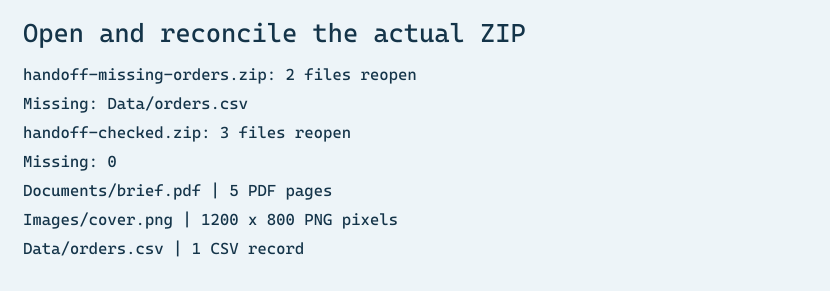
Open critical deliverables from the candidate itself. The lab reopened the brief as a five-page PDF, decoded the cover as a 1200 × 800 PNG and parsed the repaired archive’s CSV. The CSV should have a data record with order 001 and status ready. Reading the saved identifier also checks that the consumer can see the expected text. On a paid project, use an equally clear signal such as the approved brief title, a known page, an expected revision or a functional smoke check requested by the client.
- Compare a digest when you have an approved file to match exactly.
- In this exercise each reopened file is checked against its expected SHA-256 and byte length.
- A digest confirms that you have the same bytes as the reference.
- Use the opening check as well, so a match to an unreadable or incorrect reference does not become an approval.
- When references are allowed to differ, state the requirement you used to accept the contents.
Record the failure and verify the corrected candidate.
Write down the failed check, the expected path, the observation and the candidate name. For this exercise the result is missing Data/orders.csv inside handoff-missing-orders.zip. Use the approved file to correct the candidate, then run the entire checklist again against the new ZIP. Opening a CSV beside an incomplete candidate does not establish that the repaired candidate contains it.
- zip.
- It measured 52,862 bytes.
- The reopen step found all three expected files, each matching its approved digest, and the CSV parsed with the expected one record.
- The two original files still match their expected bytes.
- Keep the incomplete sample only as evidence while reviewing the exercise.
- The corrected candidate is the one that can satisfy this checklist.
Check the message and record the final result.
Confirm that the title in the message, the attachment or URL and the candidate you checked all point to the same version. Look for required instructions or credentials that need an approved channel. If access is part of the project, check it from the approved recipient perspective and record what was confirmed. The sample tests local archive evidence. A client account test belongs to a delivery where an account and permissions exist.
- In the review note, record the candidate, the final location and each result.
- For the repaired sample, mark archive readable, three expected paths present, contents open and digest checks pass.
- Record the disposition of any extra items or pending destination checks.
- If you change the file after signing off, repeat the checks for the changed copy before sending it.
Check your result
The test reopened each actual ZIP, listed its paths against the outside inventory, checked the lengths and hashes of every file present and decoded the payloads by format. The incomplete artifact was missing exactly Data/orders.csv. The repaired archive had no missing or unlisted paths. The table below shows what opened in both cases, including the entry that passed only after being restored.
Use this short sign-off list beside your own candidate:
- The candidate filename and outgoing link or attachment agree.
- Every approved path is present, and any extra entry has been reviewed.
- The key documents, images and data reopen and match the approved reference.
- Any failure has a recorded correction and a fresh check of the candidate.
- The delivery note and recipient access checks agree with the version being sent.
| Approved path | Expected bytes | Incomplete archive | Verified archive |
|---|---|---|---|
| Documents/brief.pdf | 3792 | 5 PDF pages | 5 PDF pages |
| Images/cover.png | 62824 | 1200 x 800 PNG pixels | 1200 x 800 PNG pixels |
| Data/orders.csv | 23 | Missing | 1 CSV record |
Common mistakes
Trusting a list inside the ZIP without checking it against agreed deliverables. Keep an independent copy of the approved list and verify the actual file paths.
Reusing the previous extraction folder. Inspect the current archive directly or extract to an empty folder so leftover files cannot hide a missing entry.
Checking only the outer ZIP. Open key payload files as their actual formats and inspect a known field or page.
Fixing a local copy and sending a different candidate. Verify the replacement as a fresh candidate before linking or attaching it.
Limitations
The lab tests a small local archive and known approved references. It checks paths, hashes and readability of the three delivered files. Recipient login, link sharing and a client’s software environment require checks at the destination when those are part of the handoff.
Test record
Tested on 2026-11-23 with Veylunex Workspaces 1.0.0 under Node.js 26.4.0. The lab unpacked both candidates with fflate 0.8.3, opened the PDF with pdf-lib 1.17.1, decoded the image with sharp 0.35.5 and parsed the CSV with the Data Workspace engine. The incomplete candidate lacked Data/orders.csv. The corrected candidate contained and reopened all three approved files.
The measurement record lists the local outputs and their SHA-256 digests.
Tested in
Questions
Is a successful unzip enough?
Also check each approved path and open the files that matter. The incomplete sample unzipped while an expected CSV was absent.
Should I compare the archive bytes or the bytes of each file?
An archive digest helps identify the exact candidate. Individual digests let you establish that each payload matches its approved file and identify discrepancies.
Who should check the final location?
Use an authorized view appropriate to the project. Keep separate records for local content and the recipient access check so both are visible.
When should I repeat the checklist?
Repeat it when the archive, storage location or recipient permissions change after the previous check.