Set up file names and invoice numbering
Name project files with stable invoice references and check the order against a saved file listing.
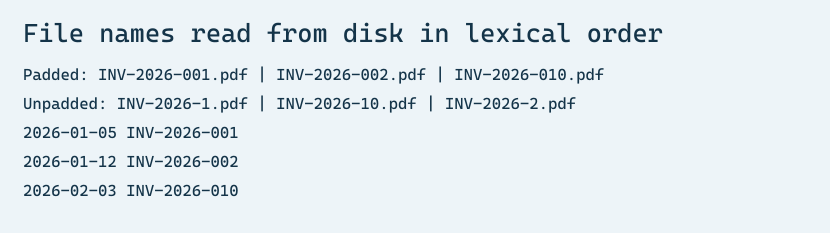
Keep the issued invoice number as a stable identifier, pad the sequence to a consistent width inside one series, and put the verified identifier in the attachment filename beside a recognizable project or client label. On disk, the test sorted invoice filenames ending in 001, 002 and 010 in the same sequence as their recorded dates, while the unpadded set sorted as 1, 10, 2. Use the same date convention across project files, then compare both the filename and the number inside each reopened document before sending it or using the folder as an index.
What to look for
Use this guide when invoice attachments arrive under names like invoice-final, the download folder has multiple copies with nearly identical names, or an ordinary alphabetical list groups later numbers ahead of earlier ones. You may also need it when a colleague can find an invoice in a spreadsheet but cannot tell which saved PDF corresponds to that record.
Two identifiers can be useful at once. The invoice identifier points back to the issued record. A project filename gives someone enough information to find and recognize the attachment among other documents. Decide what each part of the name is used for. A file can be renamed for delivery while its contents and issued reference stay the same. If you need a different document, use the appropriate version or corrected source from your issuing process and check its reference before renaming.
Why it happens
Before you begin
Download invoice-files.zip and the recorded sort order. The ZIP includes three folders called padded, unpadded and attachments. Each holds copies of the same three one-page training PDFs. The records in issue-date order are INV-2026-001 on 2026-01-05, INV-2026-002 on 2026-01-12 and INV-2026-010 on 2026-02-03. There are deliberate gaps between the last two invoice numbers in the test fixture. The PDFs are practice examples, and all the references and project labels were created for the exercise.
Get the issue date and the exact number from a source your team trusts, such as the issuing system or an approved export. For ordinary project files, decide what a leading date means. It might describe the issue date, an approval date or a delivery date. Mixing those meanings inside a single folder makes the sequence hard to interpret. For the attachment examples, the leading date is the issue date from the PDF. Confirm the convention before changing any names.
The sample uses an ISO-style calendar date and a consistent separator. Short stable client and project labels are easier to review than long descriptive phrases, especially when the same filename will be shown in a narrow attachments column. Keep details the recipient needs to identify the file and omit information that belongs only in internal records.
Steps
Write down the identifiers and their source.
List the invoice number, issue date, project label and current PDF path for every intended attachment. Open the document and compare the visible reference with that list. If a label from your folder disagrees with the issued record, find the approved file before attempting to make the names consistent. The verified references in this exercise are also printed in each training PDF and present in the document title read by the test script.
- Once a reference exists, copy it exactly into the attachment name, including its prefix and zeros.
- Use the agreed document type so that a proposal, an invoice and a receipt do not look interchangeable when downloaded into the same folder.
- A name can help retrieve the record, while the system that issued it holds the authoritative identity and status.
Choose one pattern for ordinary project filenames.
Put dates in year, month and day order with leading zeros. Follow with a recognizable customer or project label and a document identifier. The first example attachment is 2026-01-05_acme_catalog_INV-2026-001.pdf. The prefix is the issue date in this folder, acme and catalog are labels used for retrieval, and the invoice reference is included as issued. Preserve the .pdf extension when only changing the name.
- Check the intended reader’s perspective.
- If they only know the project name, place it where it is visible when paths are listed or searched.
- If the team primarily sorts by the issued date, keep that date at the beginning.
- Where imported filenames need a revision suffix, make its meaning clear in the delivery notes and retain a mapping to the approved copy.
- Use a separate field for revision if readers will also search for the exact invoice reference.
Keep the sequence width consistent within a series.
An ordinary lexical sort compares characters from the left. With a common prefix, filename suffixes 001, 002 and 010 put the lower numeric references first. The exercise chose three positions so that the numbers used in the fixture all fit. If choosing a new series where you control the pattern, use a width appropriate to its expected range and decide what will happen when it is exhausted. When an existing issuer already decides the reference, preserve that reference and put any extra sorting key in a separate filename segment.
- Compare issued dates with the sorted list.
- The expected sequence for the example is January 5, January 12 and February 3.
- It agrees with the padded filename order because the underlying sequence increases with the issue dates in this fixture.
- A project with backdated issues, multiple series or imports from several issuers should be sorted by the intended date or sequence field explicitly.
- Padding cannot supply chronology if the underlying records use another rule.
Run a plain file listing before you commit to the names.
Open the sample folders and list the filenames in ascending lexical order. The lab used Node’s directory read followed by its default string sort on the resulting filenames. The unpadded comparison is INV-2026-1.pdf, INV-2026-10.pdf, INV-2026-2.pdf. The padded comparison is INV-2026-001.pdf, INV-2026-002.pdf, INV-2026-010.pdf. Some visual file browsers use natural sorting, which can mask the unpadded ordering. Use an ordinary string sort when you specifically want to test the filename convention.
- If you run the test on your own names, check whether the dates and series prefixes are consistent and whether the target app recognizes uppercase and lowercase names as distinct.
- Export or save the sorted list beside your approved mapping.
- A filename change should survive being copied into a fresh delivery folder or distributed through a ZIP archive.
Verify on copies and reopen the outgoing files.
Keep the originals while testing the pattern. Check that each target name is unique before applying any changes. Compare the visible invoice reference and issue date inside each PDF with its new filename. In the exercise, the padded, unpadded and dated filenames for each record all contain identical file bytes. We checked this using each corresponding SHA-256 digest. That is a useful check if your intended operation only changes names.
- Before sending, open the actual attachment from the delivery location.
- Check the number in the document and in the message or cover note.
- Search the final folder for one exact reference and make sure you can find the matching file without guessing.
- If two files claim the same issued number, consult the issuing system and the review log before deciding which copy to send.
Check your result
The lab wrote the three sets of PDF files to disk, read each folder and sorted the filenames as strings. It saved that reading order and then reread the archived copies. For every issued reference the PDFs reopened as one page, their document titles contained the matching padded number, and the digest for each of the corresponding three filenames agreed. The sort result demonstrates the naming behavior using a real file listing. The comparison image renders the measured list beside the issue dates from the fixture.
For a production folder, compare the sorted order with an authoritative record instead of relying on order alone. For a machine process that overwrites files or moves them across folders, do a dry run with a few copies first, review collisions and keep the old-to-new mapping until the recipient has the needed attachments.
| Issue date | Invoice reference | Padded filename | Dated attachment filename |
|---|---|---|---|
| 2026-01-05 | INV-2026-001 | INV-2026-001.pdf | 2026-01-05_acme_catalog_INV-2026-001.pdf |
| 2026-01-12 | INV-2026-002 | INV-2026-002.pdf | 2026-01-12_acme_catalog_INV-2026-002.pdf |
| 2026-02-03 | INV-2026-010 | INV-2026-010.pdf | 2026-02-03_acme_studio_INV-2026-010.pdf |
Common mistakes
Changing an invoice number by editing only its filename. Obtain the correct document from the issuing process and compare the visible reference before renaming.
Padding only the earliest numbers. Pick one width for a series under your control and validate the sort when a sequence grows.
Assuming a visual file browser used an ordinary alphabetic sort. Verify the saved names with a lexical listing or a system whose sort you can control.
Using revision dates as issue dates without a clear marker. Document what the leading date means and use an independently verified issue date for invoice attachments.
Limitations
The lab controls the reference order and issue dates for a single training series. It checks local files and lexical ordering. Keep using your own issuing system for authoritative records. Sorting or renaming a saved document does not update the issuing record.
Test record
Tested on 2026-11-23 with Veylunex Workspaces 1.0.0 under Node.js 26.4.0. The lab wrote and reopened the training PDFs using pdf-lib 1.17.1 and archived them with fflate 0.8.3. An actual directory listing sorted the padded filenames in issue-date order and the unpadded filenames as 1, 10, 2.
The measurement record lists the local outputs and their SHA-256 digests.
Tested in
Questions
Can I add padding to a filename for invoices that were already issued?
Preserve the original invoice number inside the document and in your records. If you need a sorting prefix for filenames, add it separately where readers can distinguish it from the issued reference.
Where should I put the project label?
Choose a consistent position based on how people find the file. The test uses date, then client and project, then the invoice reference.
Why does my file browser put 2 before 10 even without padding?
The browser may use natural sorting for runs of digits. The sample uses a plain lexical sort, where the first differing character decides the order.
Does the file date prove when the invoice was issued?
Use the date from the issued record or document. File timestamps can reflect a copy, backup or download.