Deduplicate orders in one export by unique key
Clean one order snapshot with a documented survivor rule and trace the count and amount changes to specific rows.
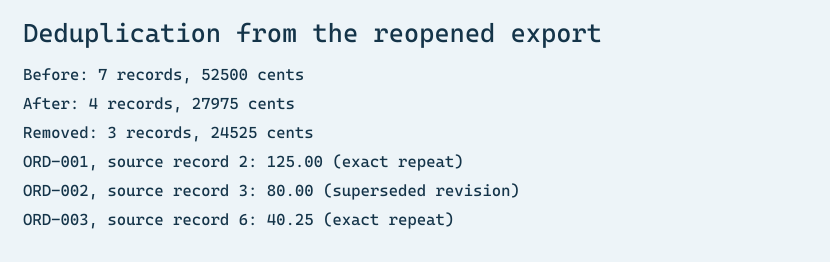
Group the rows in one order CSV by the exact order ID, distinguish identical repeats from conflicting records, and apply an approved rule for the survivor before removing anything. The example keeps the highest verified revision per order, records each removed source row and preserves earlier positions when the rows are identical. It reduces seven records to four, with 525.00 falling to 279.75 and the removed amounts adding to exactly 245.25, so you can trace both the record count and the amount change back to the actual records that left the table.
What to look for
Use this guide when one exported table repeats the same order ID and you need a single current record per order. Some rows may be identical because a source repeated them. Others may carry an earlier amount or status for the same order. Treat the two situations differently. Selecting the first matching row in an unreviewed export can keep an obsolete value and drop the current one.
Check the level represented by one row before applying a rule. A line-item export can legitimately contain several rows for one order because each row represents a different item. The example is an order-level snapshot and uses the order ID as the key. A totals row, spreadsheet subtotal or grouped display does not establish what an individual CSV record represents. Ask for that definition if it is missing.
Why it happens
Before you begin
Download orders-source.csv. It has four columns: Order ID, Revision, Amount and Status. There are seven data records, and the header is outside that count. ORD-001 and ORD-003 each have an identical repeat. ORD-002 appears twice with different values. Revision 1 is pending at 80.00. Revision 2 is paid at 95.00. ORD-004 occurs once. The removal ledger uses record numbers starting just below the header.
For this exercise, treat a valid higher revision in the same order series as the approved replacement for an earlier one. Break ties between fully identical records by keeping the earlier source record. When two rows share an ID and revision but disagree on any stored value, pause and resolve the conflict against the original order before exporting. The local test exercised that rejection using two different amounts at the same revision. In your own data, confirm who authorizes replacements and which revision or time field is trustworthy.
Keep an untouched copy of the CSV. In a separate working copy, preserve the order IDs as text. Retain whatever punctuation or leading digits the export uses. Decide which amount field and currency you are reconciling before adding anything. The sample contains decimal amounts in one convention and uses two fractional digits. The checks convert those strings to integer cents so the sum can be compared as an exact value.
Steps
Confirm the key and the row scope.
Inspect the header and a few rows from the original CSV. Check that you have one intended business entity per order ID. Look for blanks, accidental spaces, mixed numbering conventions or a second source that restarts its numbering. If a valid key is a combination such as order and line number, keep those columns together and review the intended output at that level. Run the duplicate check on the actual source text so a spreadsheet import cannot silently transform an identifier.
- Record the original data positions before sorting.
- Here, order ORD-002 appears at source records 3 and 5.
- Those numbers help you find and inspect the two different rows after producing an output.
- They are distinct from the row levels used by an editor that counts the CSV header as a row.
Inspect groups and classify the repeated rows.
Group by the exact ID and compare the values inside each group. For ORD-001, records 1 and 2 match in revision, amount and status. For ORD-003, records 4 and 6 also match. ORD-002 has two revisions and two different states. Keep both rows in view until you know which revision the export is supposed to represent. A difference in amount is especially worth checking because an automatic choice can change every calculation downstream.
- Before running the deduplication, write the rule in the review notes and identify any groups it cannot settle.
- In the example, higher verified revision wins.
- The selection logic checks for contradictory values within any same-ID, same-revision pair and halts when it finds one.
- This gate keeps an unresolvable tie out of the output.
- Leave an unresolved group for review when your actual export lacks a reliable deciding field.
Order the working rows for the keep-first pass.
In a copy of the source, sort by order ID and descending numeric revision, then by original record number. Make sure the reorder moves entire rows. If you use a spreadsheet, verify the working copy’s field types and export, since sorting one visible column without its neighbors would detach amounts from their orders. Include the original record numbers in the review ledger. The first row in each group will be the highest verified revision, and the first of two identical rows will be the one with the lower source position.
- Apply a keep-first deduplication using only Order ID as the key.
- The local test uses the site’s Data Workspace deduplication engine on the already ordered rows.
- The result is ORD-001 revision 1, ORD-002 revision 2, ORD-003 revision 1 and ORD-004 revision 1.
- Open the exported order CSV and find ORD-002.
- 00 and paid.
- If you find the earlier pending row, review both the sort and the documented survivor rule.
Record every omitted input in the ledger.
For each removed record, include its order ID, amount, revision, original record position, the retained position and the reason. In the test this records 125.00 from ORD-001 record 2 and 40.25 from ORD-003 record 6, both exact repeats. It separately records the 80.00 pending version of ORD-002 at record 3 as superseded by record 5. This makes it possible to see which removals reflect repeated copies and which reflect a choice about the current order.
- For your own sheet, put the ledger beside the output and note the version of the source from which the record positions were taken.
- If you import into a new system, look up a few retained IDs against the approved export.
- A ledger makes it easier to explain a changed total or rerun the process when the upstream decision changes.
Reconcile the records and amounts from the saved files.
Count the original rows and the retained rows, and compare the difference to the number of entries in the ledger. Seven minus four equals three in the sample. Add the original and retained Amount values in cents and compare their difference to the sum of the removed rows. Here 52,500 minus 27,975 equals 24,525 cents. The ledger independently shows 12,500 plus 8,000 plus 4,025 cents, which also equals 24,525. Check that the retained CSV contains a distinct ID on each of its four rows.
- The original sum includes repeated and superseded values, so the subtraction explains how the table changed under the rule.
- Keep the source snapshot and the ledger available if a reviewer asks why the summed values moved.
- If either count or amount fails to reconcile, stop at the saved working copies and trace each discrepancy to an actual record before using the cleaned table.
Check your result
The lab used the local data-processing engine to parse the source, keep the first row for each key after the reviewed ordering, export the result and parse the saved output again. It checked the retained order IDs and amounts, counted all removed entries, and verified the cents difference against the removals. A conflicting equal revision caused the precheck to stop. The recorded sample files let you repeat the check without depending on the displayed total.
Verify the intent before choosing a tool. This process cleans a single snapshot containing repeated IDs. If the job is to explain additions, removals or changes between two dated exports, that calls for a keyed comparison of two snapshots. If the repeated evidence is a set of copied files with similar names, a file content check is a different operation.
| Order ID | Removed record | Removed revision | Removed amount | Removed status | Kept record | Kept revision | Reason |
|---|---|---|---|---|---|---|---|
| ORD-001 | 2 | 1 | 125.00 | paid | 1 | 1 | exact repeat |
| ORD-002 | 3 | 1 | 80.00 | pending | 5 | 2 | superseded revision |
| ORD-003 | 6 | 1 | 40.25 | paid | 4 | 1 | exact repeat |
Common mistakes
Treating order ID as a unique line-item identifier. Confirm that the intended output is one row per order, or use the right combined key for line items.
Removing rows on an arbitrary first-match rule. Review conflicting groups and order the work so the approved record comes first.
Choosing a survivor for conflicting values in the same revision. Hold the group and resolve it against a trusted record before exporting.
Adding rounded display values or omitting the removed ledger. Reconcile exact cents and keep the ledger row for each removed amount.
Limitations
The example uses one export of synthetic orders, a validated revision rule and one amount field. It describes how to reconcile a cleaned snapshot against the supplied inputs. Separate currencies, partially refunded orders and item-level data need rules defined by the owners of those records.
Test record
Tested on 2026-11-23 with Veylunex Workspaces 1.0.0 under Node.js 26.4.0. The Data Workspace engine kept 4 of 7 records. The 24,525-cent change matched the sum of the 3 removed rows. A separate same-revision conflict was rejected.
The measurement record lists the local outputs and their SHA-256 digests.
Tested in
Questions
Does the higher revision always win?
Only use this rule when the export owner confirms that a higher revision is the current complete order record. Resolve any same-revision disagreement before running the export.
Why keep a ledger if the output has one row per order?
The ledger explains why individual values disappeared and gives a second way to check the change in record count and amount.
Can I select every column as the deduplication key?
All-column matching can identify exact repeats. It leaves a changed earlier revision in the file. To produce one current row per order, review the differences and use the approved order-level key.
What if an order ID is missing?
Keep the source intact and investigate the missing value. Exclude it from automatic grouping until the real identifier or a separate handling rule is known.