Compress a large PDF without losing readability
Choose a PDF compression setting with a real text comparison and a close inspection of fine image detail.
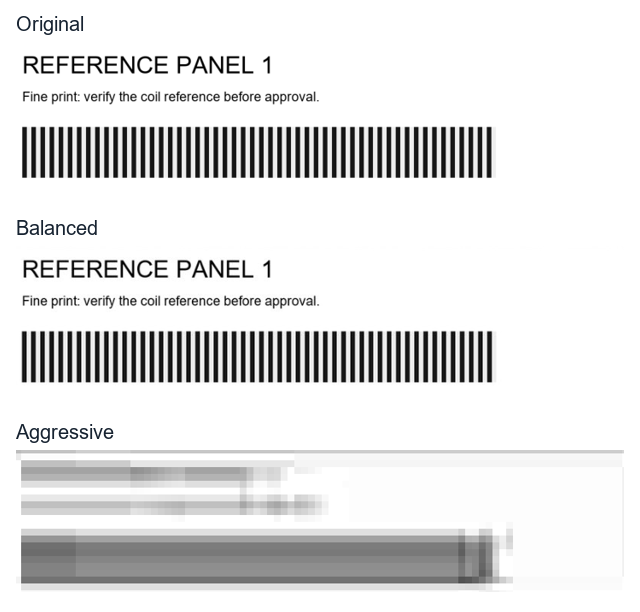
Identify what makes the PDF large and decide which details must survive, then make separate compression trials from the same original and verify both searchable text and page appearance before choosing what to send. In this lab the balanced copy preserved the extracted text and kept the fine print and reference bars readable, while the more aggressive copy kept the same extracted text and visibly lost the raster details. Reopen each downloaded version, compare the critical pages at the same scale, and use measured file size alongside those checks.
What to look for
Use this workflow when an attachment is too large to send or a delivery portal rejects it even though the document looks clear. This guide is particularly useful for a PDF that combines selectable text with large image panels. Some important content may exist inside a photographed page or a screenshot. A search can succeed on the vector text while a scale, legend or image caption becomes hard to read. Choose an example page that represents each kind of detail the recipient needs before testing output settings.
If the real requirement is to remove pages or redact content, review that scope independently. This exercise keeps the same pages and rewrites their images to study how byte savings affect readability.
Why it happens
A PDF stores text, drawing instructions and images separately. Downsampling a large image and encoding it more tightly can reduce its byte count while leaving the text objects in place. Image details can then degrade even when text extraction returns every character. The verification has to exercise both layers.
Before you begin
Start with image-text-original.pdf. The synthetic file has two pages and weighs 9,172,742 bytes. Each page has a selectable heading and instruction plus a 1656 by 1224 pixel reference panel with a fine-print sentence and alternating dark and light bars. The textured background makes the image streams substantial. The small type and linework give you fixed reference areas to compare after compression.
Keep the source open and record the page count, path and byte size. For your own file, identify each page with a caption, figure marking, hand annotation or other detail the recipient must read. Use these areas to define acceptance. A file size on its own cannot tell you whether the document is ready to deliver.
Steps
Inspect the original and pick a verification target.
Open both pages. Select and copy their headings or extract the text with the PDF library. Then look at the fine print inside the raster reference panel. This line is part of the image, so you need to judge it from the rendered pages. Also check the alternating bars. They expose changes in fine detail at the same magnification more reliably than a large heading does.
- Record which material your own recipient will use.
- It may be a dimension on a diagram, a text label embedded in an image, or small print near a signature.
- Save the original or a verified copy in a separate place.
- If the delivery workflow depends on a signature, form field or interactive feature, check it separately before relying on a rewritten PDF.
Prepare the balanced trial from the source.
The measured run used PyMuPDF to replace each known image in the source PDF while keeping the page geometry and selectable text. Pillow resized the panels to 1242 by 918 with Lanczos resampling and encoded each as JPEG at quality 82. The saved trial weighed 1,670,139 bytes. Opening the PDF again showed two pages with the same extracted text.
- Use controlled settings and save the trial under a new name.
- To reproduce this fixture, process the image pixels at those dimensions and replace the intended image stream on its original page before saving.
- For other PDFs, inspect the image placement and references first.
- A page can reuse an image or use multiple images, masks or layered drawings.
- Check that the rewrite changes the intended reference rather than choosing an image object blindly.
Make a separate aggressive trial so you can see the failure.
Start from the original again. In the test, the second branch shrank the panels to 138 by 102 and encoded them at JPEG quality 8. The output weighed 8,731 bytes. The extracted text still matched the original on both pages. In the rendered comparison, however, the embedded fine-print sentence was visibly unreadable and the black and white bars turned into broad gray bands.
- Use the visible results to decide when to stop reducing the figures.
- The aggressive example changes both image dimensions and JPEG quality.
- It shows what happened under this combined setting.
- To learn which adjustment matters for your own file, vary one setting at a time from the source and measure the written output.
- Keep a known acceptable trial until you have a better one.
Compare text, layout and raster details after saving.
Extract the text from each saved page and compare it with the corresponding source page as a complete string. Check the counts and order first. For the raster part, render the original and the two outputs at the same 144 DPI and use the same crop on the critical panel. The lab took grayscale samples at the intended dark and light bar positions and subtracted the average dark reading from the average light reading. That gives a repeatable separation measure for these known bars.
- 68 on each.
- The aggressive version’s measured separation fell to 0.
- Inspect the actual crop while using that number.
- The balanced text and bars can still be read in the proof, and the aggressive fine details merge together.
- One fixed crop and rendering scale make those changes easy to compare.
Use the smallest version that meets the actual requirement.
Open the accepted file the way the recipient will read it. Check the smallest useful wording and markings at the intended zoom, and confirm the actual size in bytes. The balanced sample is the acceptable choice in this lab when the panel must remain legible. If that result still misses a strict delivery limit, work from the source on a series of controlled candidates or arrange another delivery channel.
- Give the selected copy a meaningful name.
- Confirm that it contains the right pages and textual content and that the intended receiver can read the areas you protected.
- Save the exact version you reviewed.
- Keep the original until the delivery is accepted so you can prepare a revised copy without repeatedly compressing the same pixels.
Check your result
Check the actual three PDFs in order and compare sizes, page counts and text per page. The report records exact string equality for both saved compression trials. Compare the rendered crop on the sample’s first page and the measured bars on both pages. If the purpose is to read the fine print, use the rendered comparison to decide whether a search or copied text is sufficient evidence for the document.
Downloads include the original, the balanced copy and the aggressive failure case. Inspect the same rectangle at the same scale in all three. In a different document, choose a representative page and a specific visual task, then repeat the checks on the actual download rather than relying on a preview or preset name.
| Bytes | Text identical on each page | Rendered band contrast | |
|---|---|---|---|
| image-text-original.pdf | 9172742 | true | 216, 216 |
| compression-balanced.pdf | 1670139 | true | 209.68, 209.68 |
| compression-aggressive.pdf | 8731 | true | 0, 0 |
Common mistakes
Checking copied text alone. Look for information embedded in images and inspect that content at a fixed scale. The severe failure retained the separate searchable text.
Changing the view size between results. Use the same renderer, crop and scale for comparisons. Open at the destination’s actual scale as a separate check.
Making each trial from the previous compressed output. Restart each comparison from the original so each candidate has a clear set of settings.
Treating the smallest file as automatically acceptable. Take the byte count together with what the reader must be able to identify. Keep the version that passes those checks.
Limitations
These sizes and grayscale readings describe this particular chart, fixture and renderer. Final readability depends on your page content and delivery conditions. Review structural features of important PDFs separately if the receiver needs their forms, navigation or signatures.
Test record
Tested on 2026-11-23 with PyMuPDF 2.1 under Python 3.14.4. The balanced export was 1,670,139 bytes and the aggressive one was 8,731 bytes. Both matched the original extracted text. The aggressive export lost the stripe contrast on both rendered pages. Image processing used Pillow 13.0.0.
The measurement record lists the local outputs and their SHA-256 digests.
Tested in
Questions
Why can the extractable text match when a page looks blurry?
The fixture has separate text and raster objects. Compression changed the images, including small wording inside them. Compare both the copied text and the visible image details.
Which trial is suitable for this practice document?
Use the balanced output if the recipient must read the reference panel. Its measured bars remain distinct and the sentence is readable in the fixed crop. Review the actual size limit for your delivery.
How can I choose a critical region in another PDF?
Pick an area the recipient will use and inspect it the same way across exports. Fine labels, dimensions and lightly printed details are good examples. Keep a recognizable reference from the original.
What if the source is already small and readable?
Check the actual delivery limit and the saved file. If it meets the requirement, use the verified original copy or prepare another version only when the receiving workflow calls for it.