Merge client PDFs and add page numbers
Assemble approved PDFs in order and verify a continuous footer on every page of a reopened packet.
Write down the intended order of the source PDFs, merge them in that order, and add the new packet’s footer numbers only after confirming how many pages the merged document actually contains. The practice packet combines a two-page brief, a three-page estimate and a one-page approval into six pages with a continuous Page N of 6 footer. Reopen the numbered copy and compare the first heading and the footer on every page, paying particular attention to the point where one source ends and the next begins.
What to look for
Use this when a client should receive one reading copy instead of several PDF attachments, especially if a person needs to cite a page in that combined packet. Each source may have its own title, page count and existing numbering. The recipient needs an order that makes sense across those boundaries and a separate packet sequence that can be verified after saving.
A merge can complete and still yield a wrong result. A source may be added twice, an attachment may be missing, or a footer can be stamped before a late reorder. It helps to record the expected junctions before creating the new file and to look for them when opening the actual output.
Why it happens
Merging copies pages from separate sources into one ordered document. A footer that is placed after that operation can use the final physical position. Existing numbers drawn in the source remain part of the page. Select a footer position that is clear and explain which numbering a reviewer should use when the original pages also contain labels.
Before you begin
Use brief-2-pages.pdf, estimate-3-pages.pdf, and approval-1-page.pdf. The brief contains Client brief and Scope. The estimate begins with Estimate and continues through Materials and Payment schedule. The approval contains one page titled Approval. The intended order is brief, estimate, then approval, which gives an expected total of six pages.
Keep copies of the sources. Open each one and check the first and last heading and the physical page count. Review the bottom of each page for space to place the packet number. The fixture provides blank space there and uses a consistent page setup. If your files use different sizes or orientations, inspect the actual footer area before applying any rule. Choose a destination filename distinct from the inputs.
Steps
Plan the reader’s order and check each source.
Start by writing a short manifest of the files and expected page ranges. For the test, the brief occupies the first two pages, the estimate follows for three, and approval ends the packet. Use the headings as independent anchors. The next page after Scope should be Estimate. The last page should contain Approval.
- For real client files, confirm that each PDF is the intended revision and opens normally before adding it.
- Replace any draft with the approved source before counting pages.
- If the brief depends on a separate cover or an estimate references later material, account for that in the reading order.
- Keep the list of input names beside the merged copy so you can trace the pages during review.
Append the original pages in the chosen order.
Open an empty destination with PyMuPDF and insert each source PDF in sequence. Count the pages from the actual destination. The measured result was six pages, equal to two plus three plus one. Check this count before placing a footer, and compare the first headings at the boundaries to make sure the desired files reached the correct positions.
- Keep one copy of each intended source in the plan.
- If the sum differs from the merged result, inspect the source list and the page ranges you copied.
- A duplicate or a page omitted deliberately has to be reflected in the count and in the reading order.
- Make the adjustment on the input plan and then regenerate the merged copy.
Add a continuous sequence to the final positions.
Iterate through the pages after the merge and insert a footer based on the current position and the final total. In the fixture, the text was placed near the lower left, in space reserved for the new stamp. The following loop matches the measured approach.
-
import pymupdf
-
names = [“brief-2-pages.pdf”, “estimate-3-pages.pdf”, “approval-1-page.pdf”] with pymupdf.open() as packet: for name in names: with pymupdf.open(name) as source: packet.insert_pdf(source) for number, page in enumerate(packet, 1): page.insert_text((38, page.rect.height - 34), f“Page {number} of {len(packet)}”, fontsize=11) packet.save(“client-packet-numbered.pdf”, garbage=4, deflate=True)
-
Use the reserved area only after checking it in your own documents.
-
If you move a page later, regenerate the numbered packet from the source plan to make the footer match its new position.
-
Check the saved pages with text and rendering.
Reopen the numbered PDF. For each page, extract its text and identify both the source heading and the footer. The measured check stripped the final footer line for comparison and required the remaining extracted lines to equal the corresponding source page. It also required the footer to match the physical position and total. The last page of the brief read Page 2 of 6, and the first estimate page read Page 3 of 6.
- Also look at each page visually.
- A footer can exist in the text while overlapping a table, lying outside the visible page, or being too close to other markings.
- Review every page type and check the first and last pages in a viewer you trust.
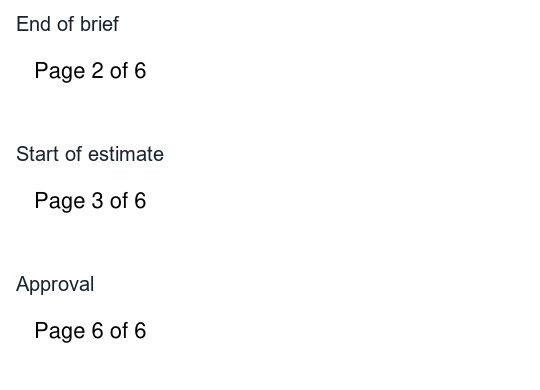
- The proof crop shows the two boundary footers and the final footer as rendered from the actual saved PDF.
Deliver the exact reviewed packet.
Confirm the final filename and compare the saved artifact with the intended delivery description. The sample begins with Client brief and ends with Approval. It contains the complete six-page sequence. If the recipient will refer to page positions, tell them to use the packet footer. Keep the originals and the agreed source order for any later changes.
- Check whether the other side needs existing bookmarks, interactive forms or original signatures.
- Handle those requirements using a workflow that tests them separately.
- For an ordinary reading packet like this fixture, check the complete text and footers, open the exact copy you intend to share, and retain the source files until it is accepted.
Check your result
Read each output page from first to last, count all six, and match every heading and footer with the table below. Verify the end of the brief, the start of the estimate and the approval at the end. The lab checked page count against the sum of the three sources, the original text on each page and the final extracted footer string. A page count would be insufficient if the pages were present in a different order.
The two additional inputs are the estimate PDF and the approval PDF. Use the saved original files and measurement record to repeat the checks. When your packet includes mixed paper sizes, verify that the footer is visible and clear on each size. Keep evidence of the agreed order with the finished copy.
| Page | Original heading | Extracted footer |
|---|---|---|
| 1 | Client brief | Page 1 of 6 |
| 2 | Scope | Page 2 of 6 |
| 3 | Estimate | Page 3 of 6 |
| 4 | Materials | Page 4 of 6 |
| 5 | Payment schedule | Page 5 of 6 |
| 6 | Approval | Page 6 of 6 |
Common mistakes
Sorting inputs by filename alone. Use the reader’s intended order and write down transitions between files. The first estimate page has an explicit place in the fixture.
Numbering before a reorder or append. Place footer numbers after the final sequence is known and check all rendered pages after saving.
Checking only the first and last page numbers. Verify every position and compare the heading at each file boundary. This catches a repeated range in the middle.
Stamping over original text. Inspect the footer area on each source page type. Reopen the output and check visible content in the actual delivery copy.
Limitations
The test covers simple PDFs with selectable text and clear space for each footer. Complex page geometry, original signatures, forms or document-level navigation require additional review. Keep the agreed source order and test the features your recipient will actually use.
Test record
Tested on 2026-11-23 with PyMuPDF 2.1 under Python 3.14.4. The sources contributed 2, 3, 1 pages. The 6-page output matched the source text on every page after its corresponding footer was excluded.
The measurement record lists the local outputs and their SHA-256 digests.
Tested in
Questions
How do I confirm the order across two source files?
Compare the final heading from the first file with the next heading in the saved packet. In the sample, Scope is followed by Estimate, and their packet footers are consecutive.
What should I do if a brief already has page numbers?
Keep the receiver’s reference convention clear. The new packet footer can be placed in separate space, and the delivery note can explain which labels to cite.
Why run text extraction after I can already see the numbers?
It checks every footer string and confirms the page sequence against the source text. A visual check is still useful for placement and readability.
Can I insert another approval after the packet is numbered?
Update the source list and regenerate the numbered packet. Reconcile the updated page count and every footer before circulating the replacement.